
How to Connect ChMS
Follow these steps to set up the integration:
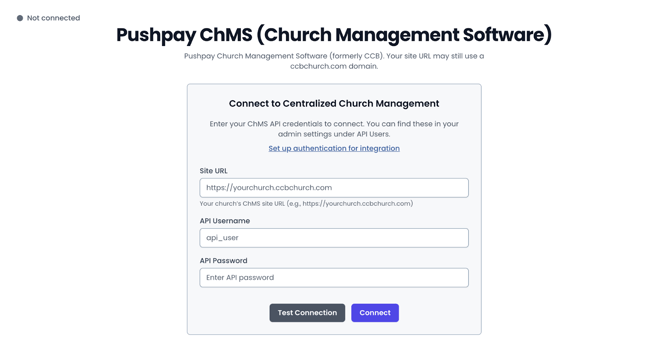
- Go to your Dashboard: dashboard.visitorreach.com
- Navigate to: Account → Manage Integrations
- Select Church Management Software Integration
- Enter your church’s ChMS URL
- Enter your API Username and Password
- Click Connect
Configure Journey Sync
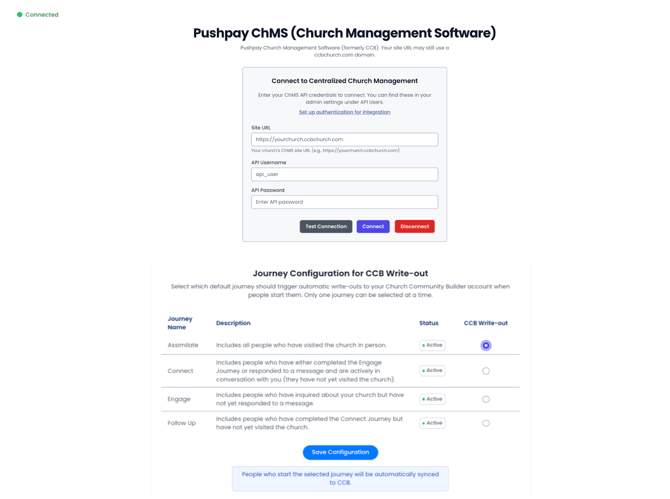
After connecting, you’ll choose which Journey will trigger the integration:
- Select a specific Journey (recommended: Assimilate)
- When a person is added to this Journey, they will automatically be written into your ChMS account
What This Means
Once your integration is set up:
- Any contact added to the selected Journey will sync to ChMS
- No manual data entry is required
- Your follow-up process stays consistent across both platforms
Tips
- We recommend using the Assimilate Journey for most churches since this would include people who have visited your church and would likely be best to add to your database.
- Make sure your ChMS API credentials are active and correct before connecting the integration.