---
title: Default Groups & Journeys
description: Discover the 4 default Groups and Journeys in VisitorReach that guide people from first contact to lasting connection with your church.
---
[Skip to content](https://connect.visitorreach.com/help/default-groups-journeys#main-content)
English
Show submenu for translations
[](https://dashboard.visitorreach.com/)
Open main navigation
Close main navigation
- English
Show submenu for translations
How can we help you?
- There are no suggestions because the search field is empty.
1. [Knowledge Base](https://connect.visitorreach.com/help?hsLang=en)
2. [VisitorReach Tools](https://connect.visitorreach.com/help/visitorreach-tools?hsLang=en)
3. [Journeys](https://connect.visitorreach.com/help/visitorreach-tools?hsLang=en#journeys)
# Default Groups & Journeys
### These Groups are tied to Journeys, which are the foundation of bringing people into your VR app and getting them connected to your church. While Groups and Journeys can be customized, these four serve as the default starting point.
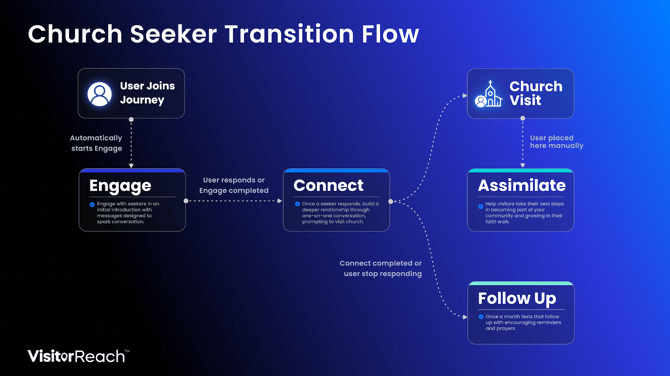
### **The 4 Default Groups & Journeys:**
1. **Engage:** This is the first place everybody will be placed as they enter your app. Engage is all about sparking a conversation and will include people who have inquired about your church but not yet responded to a message.
2. **Connect:** Once someone responds to a message (or they have completed all of the Engage Journey), they will automatically move to Connect. This will mark their passage from a casual receiver of messages to someone who is ready to actively message you. This is your opportunity to begin a conversation, get to know them, and invite them into your church community.
3. **Follow Up:** Once someone has completed the Connect Journey and has not yet visited the church, they will automatically be placed in the Follow Up Group. These messages will be less frequent than Connect, and the goal is to continue a relationship with the person, while also encouraging them to visit the church.
4. **Assimilate:** This Group/Journey transitions people from purely messaging conversations to getting them connected to your community after they have visited your church. You will manually add someone to Assimilate once they have visited the church in person by deleting their previous default Group and adding them to the Assimilate Group (or simply add a new visitor to the app in Assimilate if they are not yet connected with you). The focus is to continue a connection after their initial visit and help get them plugged into the community to strengthen the likelihood of becoming an active member of your church body.
These four default Groups and Journeys will help get you acquainted with the process of bringing people into your app and continuing to connect with them through each step, from the initial text to a thriving member of your church.
- [VisitorReach Tools](https://connect.visitorreach.com/help/visitorreach-tools?hsLang=en#main-content)
- [Dashboard](https://connect.visitorreach.com/help/visitorreach-tools?hsLang=en#dashboard)
- [Journeys](https://connect.visitorreach.com/help/visitorreach-tools?hsLang=en#journeys)
- [Conversations](https://connect.visitorreach.com/help/visitorreach-tools?hsLang=en#conversations)
- [Group](https://connect.visitorreach.com/help/visitorreach-tools?hsLang=en#group)
- [Account](https://connect.visitorreach.com/help/visitorreach-tools?hsLang=en#account)
- [Marketing](https://connect.visitorreach.com/help/marketing?hsLang=en#main-content)
- [Social Media](https://connect.visitorreach.com/help/marketing?hsLang=en#social-media)
- [Digital Health](https://connect.visitorreach.com/help/marketing?hsLang=en#digital-health)
- [Website](https://connect.visitorreach.com/help/marketing?hsLang=en#website)
- [Coaching](https://connect.visitorreach.com/help/coaching?hsLang=en#main-content)
- [Role of the Church](https://connect.visitorreach.com/help/coaching?hsLang=en#role-of-the-church)
- [Outreach & Evangelism](https://connect.visitorreach.com/help/coaching?hsLang=en#outreach-evangelism)
- [Meaningful Conversations](https://connect.visitorreach.com/help/coaching?hsLang=en#meaningful-conversations)
- [VisitorTap](https://connect.visitorreach.com/help/visitortap?hsLang=en#main-content)
- [VisitorTap 101](https://connect.visitorreach.com/help/visitortap?hsLang=en#visitortap-101)
- [Taptree](https://connect.visitorreach.com/help/visitortap?hsLang=en#taptree)
- [Placement & Best Practices](https://connect.visitorreach.com/help/visitortap?hsLang=en#placement-best-practices)
- [Managing Your Dashboard Features](https://connect.visitorreach.com/help/visitortap?hsLang=en#managing-your-dashboard-features)
- [Troubleshooting - VisitorTap Help Center](https://connect.visitorreach.com/help/visitortap?hsLang=en#troubleshooting-visitortap-help-center)
- [FAQs](https://connect.visitorreach.com/help/faqs?hsLang=en)
- [Training](https://connect.visitorreach.com/help/training?hsLang=en)
[](https://connect.visitorreach.com/help?hsLang=en)
[mailto:support@visitorreach.com](mailto:support@visitorreach.com)
Copyright © 2024, VisitorReach