---
title: Overview of Dashboard
description: Learn how to navigate your Visitor Reach dashboard with this quick guide.
---
[Skip to content](https://connect.visitorreach.com/help/navigate-dashboard#main-content)
English
Show submenu for translations
[](https://dashboard.visitorreach.com/)
Open main navigation
Close main navigation
- English
Show submenu for translations
How can we help you?
- There are no suggestions because the search field is empty.
1. [Knowledge Base](https://connect.visitorreach.com/help?hsLang=en)
2. [VisitorReach Tools](https://connect.visitorreach.com/help/visitorreach-tools?hsLang=en)
3. [Dashboard](https://connect.visitorreach.com/help/visitorreach-tools?hsLang=en#dashboard)
# Overview of Dashboard
### **Watch this 2-minute video to quickly explore your VisitorReach Dashboard key features or read below:**
### **Getting Started**
1. **Access the Dashboard:** Visit [dashboard.visitorreach.com](http://dashboard.visitorreach.com).
2. **Log In:** Use the same credentials you’ve used to access the VisitorReach app.
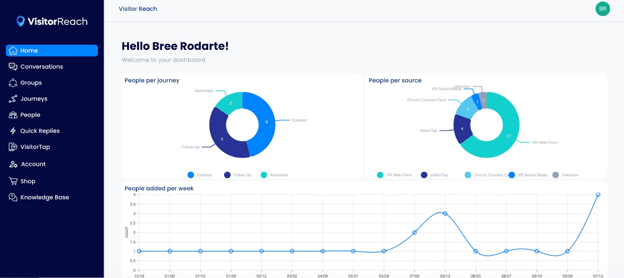
3. **Home Screen Overview:** Once logged in, you’ll land on the home screen. Here, you can view:
- **People per Journey**: The number of individuals in each journey.
- **People per Source**: Insights into where people are coming from.
- **Weekly Additions**: How many people have been added during the week.
### **Key Features of the Dashboard**
#### **Manage People**
- Easily find people by name, email, or phone number. You can also filter them by their journey stage to manage outreach effectively.
- Start engaging new visitors by adding them to your system. This allows you to begin conversations and integrate them into your church’s journey.
#### **Conversations**
- Engage in direct conversations with visitors and members, helping them feel connected to your church.
- Use this space to guide people through their journey, answer questions, and invite them to take the next steps in their faith.
#### **QuickReplies**
- Pre-written messages: Create and manage pre-written messages that reflect your church’s culture and tone.
- Quickly reply to frequently asked questions without having to type out the same messages repeatedly.
#### **VisitorTap**
- View details about your cards or stickers.
- Change URLS and create Taptrees.
#### **Shop**
Order VisitorTap products right from your dashboard.
- [VisitorReach Tools](https://connect.visitorreach.com/help/visitorreach-tools?hsLang=en#main-content)
- [Dashboard](https://connect.visitorreach.com/help/visitorreach-tools?hsLang=en#dashboard)
- [Journeys](https://connect.visitorreach.com/help/visitorreach-tools?hsLang=en#journeys)
- [Conversations](https://connect.visitorreach.com/help/visitorreach-tools?hsLang=en#conversations)
- [Group](https://connect.visitorreach.com/help/visitorreach-tools?hsLang=en#group)
- [Account](https://connect.visitorreach.com/help/visitorreach-tools?hsLang=en#account)
- [Marketing](https://connect.visitorreach.com/help/marketing?hsLang=en#main-content)
- [Social Media](https://connect.visitorreach.com/help/marketing?hsLang=en#social-media)
- [Digital Health](https://connect.visitorreach.com/help/marketing?hsLang=en#digital-health)
- [Website](https://connect.visitorreach.com/help/marketing?hsLang=en#website)
- [Coaching](https://connect.visitorreach.com/help/coaching?hsLang=en#main-content)
- [Role of the Church](https://connect.visitorreach.com/help/coaching?hsLang=en#role-of-the-church)
- [Outreach & Evangelism](https://connect.visitorreach.com/help/coaching?hsLang=en#outreach-evangelism)
- [Meaningful Conversations](https://connect.visitorreach.com/help/coaching?hsLang=en#meaningful-conversations)
- [VisitorTap](https://connect.visitorreach.com/help/visitortap?hsLang=en#main-content)
- [VisitorTap 101](https://connect.visitorreach.com/help/visitortap?hsLang=en#visitortap-101)
- [Taptree](https://connect.visitorreach.com/help/visitortap?hsLang=en#taptree)
- [Placement & Best Practices](https://connect.visitorreach.com/help/visitortap?hsLang=en#placement-best-practices)
- [Managing Your Dashboard Features](https://connect.visitorreach.com/help/visitortap?hsLang=en#managing-your-dashboard-features)
- [Troubleshooting - VisitorTap Help Center](https://connect.visitorreach.com/help/visitortap?hsLang=en#troubleshooting-visitortap-help-center)
- [FAQs](https://connect.visitorreach.com/help/faqs?hsLang=en)
- [Training](https://connect.visitorreach.com/help/training?hsLang=en)
[](https://connect.visitorreach.com/help?hsLang=en)
[mailto:support@visitorreach.com](mailto:support@visitorreach.com)
Copyright © 2024, VisitorReach