---
title: Text Message Tracking
description: Learn how text message usage is tracked, what counts toward your SMS quota, and what happens if you exceed your monthly limit.
---
[Skip to content](https://connect.visitorreach.com/help/text-message-tracking#main-content)
English
Show submenu for translations
[](https://dashboard.visitorreach.com/)
Open main navigation
Close main navigation
- English
Show submenu for translations
How can we help you?
- There are no suggestions because the search field is empty.
1. [Knowledge Base](https://connect.visitorreach.com/help?hsLang=en)
2. [VisitorReach Tools](https://connect.visitorreach.com/help/visitorreach-tools?hsLang=en)
3. [Conversations](https://connect.visitorreach.com/help/visitorreach-tools?hsLang=en#conversations)
# Text Message Tracking
## This article explains how text message usage is tracked, what counts toward your SMS quota, and what happens if you exceed your monthly limit.
### **What Counts Toward Your SMS Quota?**
All inbound and outbound text messages count toward your monthly SMS quota, including but not limited to:
- Individual 1:1 direct messages
- NurturePoint Journey messages
- Mass or group messages
- Inbound texts from contacts
- Outbound texts sent from the platform
If a message is sent or received, it is counted.
### **Monthly Text Limits by Plan**
Each plan includes a set number of SMS messages per month:
- **Bronze:** 2,500 texts
- **Silver:** 5,000 texts
- **Gold:** 10,000 texts
- **Platinum:** 15,000 texts
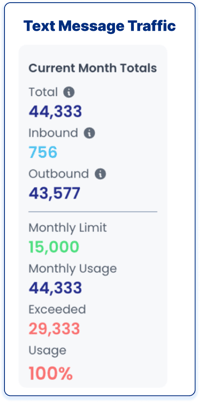
Your usage resets at the start of each calendar month. Each message has a maximum character count of 160 characters.
### 
### **Usage Alerts & Notifications**
To help you stay ahead of your usage, email notifications are automatically sent when you reach 85%, 90%, then 95% of your respective plan’s SMS limit.
These alerts give you time to decide whether you’d like to purchase additional SMS credits or continue with overage pricing.
### **What Happens If You Go Over Your SMS Limit?**
If you exceed your monthly SMS quota:
- All messages will continue to be sent without interruption.
- You will automatically be charged $0.03 per additional message if no action is taken.
There is no service disruption—only overage charges.
### **Options When You Exceed Your Limit**
You have two options if you need additional text messages:
#### **1. Pay-As-You-Go (Automatic)**
- $0.03 per additional message
- No action required—charges apply automatically
#### **2. Prepaid SMS Credit Bundle (Recommended)**
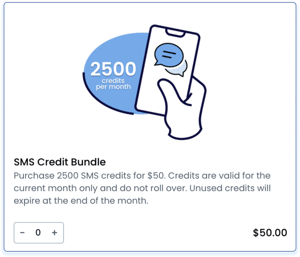
- 2,500 messages for $50 (Just $0.02 per message, equaling to 33% savings)
- Can be purchased directly from your [Dashboard](https://dashboard.visitorreach.com/) in the Shop section
### **Important Notes:**
- SMS credit bundles do not roll over, even when bought on the last day of the month.
- Unused credits expire at the end of the month.
- If you go over your amount of texts, you are able to purchase a text bundle at the end of the month retroactively. For example: if you go over 2500 before the month ends you can still buy the bundle to pay for your extra texts, but leftover texts won’t roll over.
- It is recommended to purchase a bundle at the end of the month if you are 1675 texts or more over your plan, as it would be more cost effective.
### **Best Practice Recommendation**
If you regularly approach or exceed your SMS limit, purchasing a prepaid SMS bundle is the most cost-effective option. Monitor your usage via Dashboard alerts to avoid unexpected charges.
- [VisitorReach Tools](https://connect.visitorreach.com/help/visitorreach-tools?hsLang=en#main-content)
- [Dashboard](https://connect.visitorreach.com/help/visitorreach-tools?hsLang=en#dashboard)
- [Journeys](https://connect.visitorreach.com/help/visitorreach-tools?hsLang=en#journeys)
- [Conversations](https://connect.visitorreach.com/help/visitorreach-tools?hsLang=en#conversations)
- [Group](https://connect.visitorreach.com/help/visitorreach-tools?hsLang=en#group)
- [Account](https://connect.visitorreach.com/help/visitorreach-tools?hsLang=en#account)
- [Marketing](https://connect.visitorreach.com/help/marketing?hsLang=en#main-content)
- [Social Media](https://connect.visitorreach.com/help/marketing?hsLang=en#social-media)
- [Digital Health](https://connect.visitorreach.com/help/marketing?hsLang=en#digital-health)
- [Website](https://connect.visitorreach.com/help/marketing?hsLang=en#website)
- [Coaching](https://connect.visitorreach.com/help/coaching?hsLang=en#main-content)
- [Role of the Church](https://connect.visitorreach.com/help/coaching?hsLang=en#role-of-the-church)
- [Outreach & Evangelism](https://connect.visitorreach.com/help/coaching?hsLang=en#outreach-evangelism)
- [Meaningful Conversations](https://connect.visitorreach.com/help/coaching?hsLang=en#meaningful-conversations)
- [VisitorTap](https://connect.visitorreach.com/help/visitortap?hsLang=en#main-content)
- [VisitorTap 101](https://connect.visitorreach.com/help/visitortap?hsLang=en#visitortap-101)
- [Taptree](https://connect.visitorreach.com/help/visitortap?hsLang=en#taptree)
- [Placement & Best Practices](https://connect.visitorreach.com/help/visitortap?hsLang=en#placement-best-practices)
- [Managing Your Dashboard Features](https://connect.visitorreach.com/help/visitortap?hsLang=en#managing-your-dashboard-features)
- [Troubleshooting - VisitorTap Help Center](https://connect.visitorreach.com/help/visitortap?hsLang=en#troubleshooting-visitortap-help-center)
- [FAQs](https://connect.visitorreach.com/help/faqs?hsLang=en)
- [Training](https://connect.visitorreach.com/help/training?hsLang=en)
[](https://connect.visitorreach.com/help?hsLang=en)
[mailto:support@visitorreach.com](mailto:support@visitorreach.com)
Copyright © 2024, VisitorReach