---
title: Using SMS in VisitorTap
description: Engage your congregation more effectively by connecting third-party texting services.
---
[Skip to content](https://connect.visitorreach.com/help/using-sms-in-visitortap#main-content)
English
Show submenu for translations
[](https://dashboard.visitorreach.com/)
Open main navigation
Close main navigation
- English
Show submenu for translations
How can we help you?
- There are no suggestions because the search field is empty.
1. [Knowledge Base](https://connect.visitorreach.com/help?hsLang=en)
2. [VisitorTap](https://connect.visitorreach.com/help/visitortap?hsLang=en)
3. [VisitorTap 101](https://connect.visitorreach.com/help/visitortap?hsLang=en#visitortap-101)
# Using SMS in VisitorTap
VisitorReach is excited to offer integrations with VisitorTap. This helps churches engage with their congregations more effectively by connecting with a variety of third-party texting services to extend your outreach capabilities. **This feature is only available for standalone VisitorTap Pro customers.**
### **Tap-to-Text Feature**
VisitorTap includes built-in SMS functionality through its **Tap-to-Text** feature.
A Tap-to-Text function triggers an end-user’s phone’s native messaging app with your phone number auto-populated in the ‘To’ box. A message can also be auto-populated in the ‘text’ box if you so choose.
*Please note that while VisitorReach provides the texting integration, we* ***can not offer technical support*** *for third-party platforms. If you experience any issues or have questions related to how a specific texting service works, please contact that provider’s support team directly.*
### **Overview of SMS VisitorTap Tool**
This feature allows you to utilize any phone number with texting capabilities — including third-party texting services — directly to your VisitorTap dashboard.
### **Phone Number Options**
VisitorTap will accept three different formats for texting:
1. A standard 10-digit US phone number (must be text compatible)
2. A 5- or 6-digit SMS short code (example: 80348 or 75301)
3. SMS Link (example: sms:+15129220000)
The phone number field is restricted to US numbers only (country code + 10-digit number). Country code +1 is automatically added. Formatting symbols are not allowed.
### **Opt-In Messaging Box**
In the Opt-In-Messaging field, you can pre-load a message you want to receive from an individual. It should tell you what they want to opt-in too. Here are some examples:
- “I’m new here! Please send me more information.”
- “Yes, please send me more information on kid’s camp!”
If you leave this field blank, make sure it’s clear that they can send you any message or information they choose.
#### **Add a Keyword **
Many third-party texting services include Keyword functions, so you can pre-fill the opt-in messaging field with the opt-in keyword for your texting workflow.
For example, you could pre-fill ‘21 Days of Prayer’ and members would know that they are texting that keyword in order to opt-in for 21 days of text messages with prayer topics and verses.
#### **SMS Character Limitations:**
- VisitorTap supports up to three SMS segments:
- Each segment is 159 characters.
- Total limit is 477-characters.
- As you type, the system tracks your character count message length.
- It provides the following visual indicators.
- The input box changes color as you approach the 477-character limit.
- - Once the limit is hit, additional typing is disabled.
- - As you delete characters, the visual warnings are removed.
### **SMS Setup in each Location**
**You can implement Tap-to-Text** across the entire VisitorTap platform, including each deck of NFC cards, inserted into a Taptree or within your Tap categories.
#### **SMS set-up for Individual NFC Tap Decks**
Directly connecting decks of Tap cards to SMS functionality is the most common use case for using Tap-to-Text in the VisitorTap dashboard.
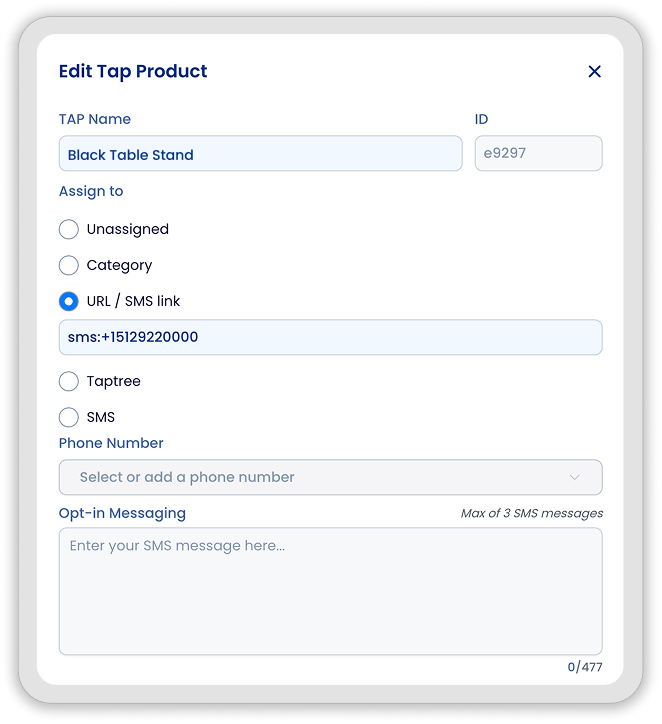
**Option One: **
- Select URL / SMS link
- An SMS link can be placed directly in any URL box (including in a Taptree).
- The SMS link will include all necessary text information including the receiving phone number and the copy of the text message so there is no need for a separate number and message box.
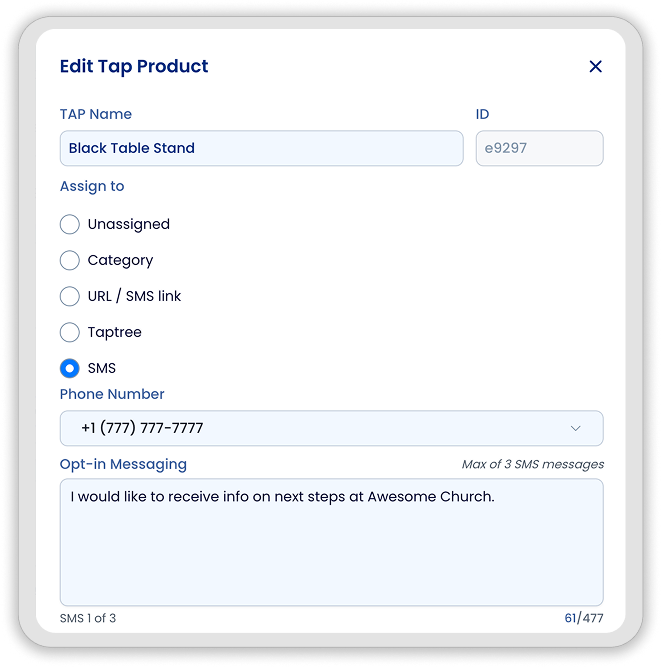
**Option Two: **
- Select SMS
- Add phone number (10-digit or SMS short code)
- Add a message body (includes real-time character counter)
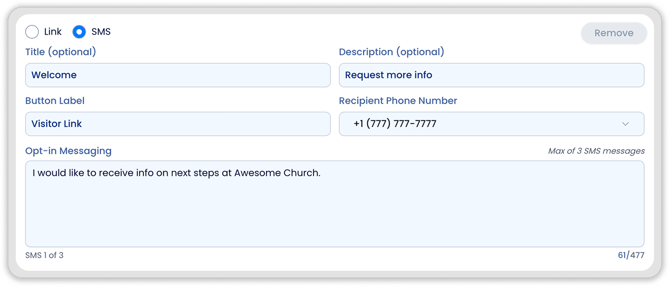
#### **SMS functionality in Taptrees: **
- Switch from Link to SMS as the action type
- Add an optional Title (ie. Receive Texts)
- Label the Button (ie. “Text Us”)
- Input a phone number (10 digit or sms shortcode)
- Add an SMS message body (optional)
#### 
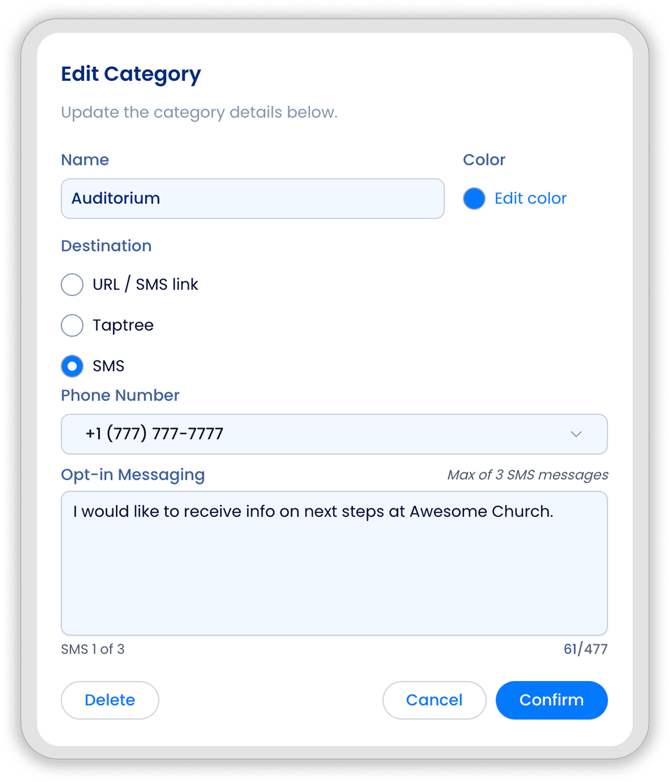
#### **SMS function added to Categories **
You can add SMS directly to a category. In doing so, all decks assigned to that category will be updated with the tap-to-text functionality.
*Please note that while VisitorReach provides the texting integration, we* ***can not offer technical support*** *for third-party platforms. If you experience any issues or have questions related to how a specific texting service works, please contact that provider’s support team directly.*
- [VisitorReach Tools](https://connect.visitorreach.com/help/visitorreach-tools?hsLang=en#main-content)
- [Dashboard](https://connect.visitorreach.com/help/visitorreach-tools?hsLang=en#dashboard)
- [Journeys](https://connect.visitorreach.com/help/visitorreach-tools?hsLang=en#journeys)
- [Conversations](https://connect.visitorreach.com/help/visitorreach-tools?hsLang=en#conversations)
- [Group](https://connect.visitorreach.com/help/visitorreach-tools?hsLang=en#group)
- [Account](https://connect.visitorreach.com/help/visitorreach-tools?hsLang=en#account)
- [Marketing](https://connect.visitorreach.com/help/marketing?hsLang=en#main-content)
- [Social Media](https://connect.visitorreach.com/help/marketing?hsLang=en#social-media)
- [Digital Health](https://connect.visitorreach.com/help/marketing?hsLang=en#digital-health)
- [Website](https://connect.visitorreach.com/help/marketing?hsLang=en#website)
- [Coaching](https://connect.visitorreach.com/help/coaching?hsLang=en#main-content)
- [Role of the Church](https://connect.visitorreach.com/help/coaching?hsLang=en#role-of-the-church)
- [Outreach & Evangelism](https://connect.visitorreach.com/help/coaching?hsLang=en#outreach-evangelism)
- [Meaningful Conversations](https://connect.visitorreach.com/help/coaching?hsLang=en#meaningful-conversations)
- [VisitorTap](https://connect.visitorreach.com/help/visitortap?hsLang=en#main-content)
- [VisitorTap 101](https://connect.visitorreach.com/help/visitortap?hsLang=en#visitortap-101)
- [Taptree](https://connect.visitorreach.com/help/visitortap?hsLang=en#taptree)
- [Placement & Best Practices](https://connect.visitorreach.com/help/visitortap?hsLang=en#placement-best-practices)
- [Managing Your Dashboard Features](https://connect.visitorreach.com/help/visitortap?hsLang=en#managing-your-dashboard-features)
- [Troubleshooting - VisitorTap Help Center](https://connect.visitorreach.com/help/visitortap?hsLang=en#troubleshooting-visitortap-help-center)
- [FAQs](https://connect.visitorreach.com/help/faqs?hsLang=en)
- [Training](https://connect.visitorreach.com/help/training?hsLang=en)
[](https://connect.visitorreach.com/help?hsLang=en)
[mailto:support@visitorreach.com](mailto:support@visitorreach.com)
Copyright © 2024, VisitorReach