---
title: VisitorTap Analytics
description: Managing VisitorTap Analytics in the VisitorTap dashboard.
---
[Skip to content](https://connect.visitorreach.com/help/visitortap-analytics#main-content)
English
Show submenu for translations
[](https://dashboard.visitorreach.com/)
Open main navigation
Close main navigation
- English
Show submenu for translations
How can we help you?
- There are no suggestions because the search field is empty.
1. [Knowledge Base](https://connect.visitorreach.com/help?hsLang=en)
2. [VisitorTap](https://connect.visitorreach.com/help/visitortap?hsLang=en)
3. [Managing Your Dashboard Features](https://connect.visitorreach.com/help/visitortap?hsLang=en#managing-your-dashboard-features)
# VisitorTap Analytics
## How to track tap engagment
### **Watch this video on how to track tap engagement or read below: **
You can view VisitorTap analytics by category or by specific decks. Each deck is identified by the last four digits of its ID.
### **Viewing by Category**
When viewing analytics under Categories, the data is grouped by the categories you’ve created. This view shows how many times each category has been tapped.
### **Viewing by Deck**
You can also view analytics for individual decks. Each deck’s data will include the last four digits of its identifier for easy reference.
### **Adjusting the Time Range**
You can change the analytics history to display data from the following time periods:
- Last 1 day
- Last 3 days
- Last 7 days
- Last 30 days
This allows you to track visitor engagement trends over different time frames.
### **Data View Options**
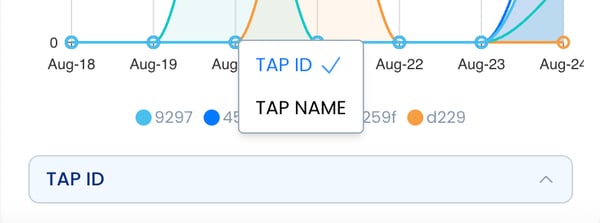
Use the bottom drop-down menu to switch between:
- Tap ID (batch number printed on your product)
- ID Name (custom name you’ve chosen for your product)
---
### Need Help?
[VisitorTap FAQ](https://connect.visitorreach.com/help/visitortap-faq?hsLang=en) | [Contact Us](mailto:Visitortap@visitorreach.com)
- [VisitorReach Tools](https://connect.visitorreach.com/help/visitorreach-tools?hsLang=en#main-content)
- [Dashboard](https://connect.visitorreach.com/help/visitorreach-tools?hsLang=en#dashboard)
- [Journeys](https://connect.visitorreach.com/help/visitorreach-tools?hsLang=en#journeys)
- [Conversations](https://connect.visitorreach.com/help/visitorreach-tools?hsLang=en#conversations)
- [Group](https://connect.visitorreach.com/help/visitorreach-tools?hsLang=en#group)
- [Account](https://connect.visitorreach.com/help/visitorreach-tools?hsLang=en#account)
- [Marketing](https://connect.visitorreach.com/help/marketing?hsLang=en#main-content)
- [Social Media](https://connect.visitorreach.com/help/marketing?hsLang=en#social-media)
- [Digital Health](https://connect.visitorreach.com/help/marketing?hsLang=en#digital-health)
- [Website](https://connect.visitorreach.com/help/marketing?hsLang=en#website)
- [Coaching](https://connect.visitorreach.com/help/coaching?hsLang=en#main-content)
- [Role of the Church](https://connect.visitorreach.com/help/coaching?hsLang=en#role-of-the-church)
- [Outreach & Evangelism](https://connect.visitorreach.com/help/coaching?hsLang=en#outreach-evangelism)
- [Meaningful Conversations](https://connect.visitorreach.com/help/coaching?hsLang=en#meaningful-conversations)
- [VisitorTap](https://connect.visitorreach.com/help/visitortap?hsLang=en#main-content)
- [VisitorTap 101](https://connect.visitorreach.com/help/visitortap?hsLang=en#visitortap-101)
- [Taptree](https://connect.visitorreach.com/help/visitortap?hsLang=en#taptree)
- [Placement & Best Practices](https://connect.visitorreach.com/help/visitortap?hsLang=en#placement-best-practices)
- [Managing Your Dashboard Features](https://connect.visitorreach.com/help/visitortap?hsLang=en#managing-your-dashboard-features)
- [Troubleshooting - VisitorTap Help Center](https://connect.visitorreach.com/help/visitortap?hsLang=en#troubleshooting-visitortap-help-center)
- [FAQs](https://connect.visitorreach.com/help/faqs?hsLang=en)
- [Training](https://connect.visitorreach.com/help/training?hsLang=en)
[](https://connect.visitorreach.com/help?hsLang=en)
[mailto:support@visitorreach.com](mailto:support@visitorreach.com)
Copyright © 2024, VisitorReach