---
title: Taptree Pro Builder Overview
description: VisitorTap Pro Builder is a customizable page-building tool within the VisitorTap platform that allows you to edit, design, and manage digital experiences for visitors. With Pro Builder, you can create a seamless, engaging experience by organizing content into dynamic sections and customizing the look and feel of your app.
---
[Skip to content](https://connect.visitorreach.com/help/visitortap-pro-builder#main-content)
English
Show submenu for translations
[](https://dashboard.visitorreach.com/)
Open main navigation
Close main navigation
- English
Show submenu for translations
How can we help you?
- There are no suggestions because the search field is empty.
1. [Knowledge Base](https://connect.visitorreach.com/help?hsLang=en)
2. [VisitorTap](https://connect.visitorreach.com/help/visitortap?hsLang=en)
3. [Taptree](https://connect.visitorreach.com/help/visitortap?hsLang=en#taptree)
# Taptree Pro Builder Overview
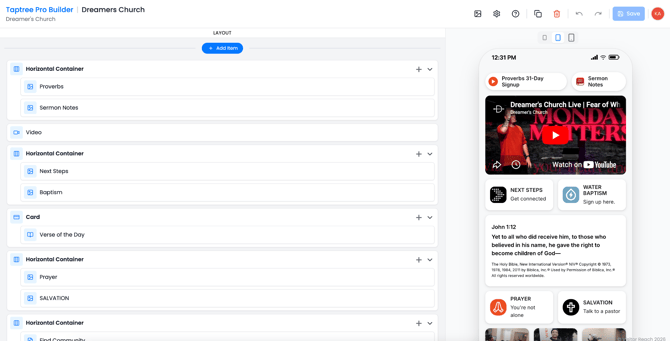
## VisitorTap Pro Builder is a customizable page-building tool within the VisitorTap platform that allows you to edit, design, and manage digital experiences for visitors. With Pro Builder, you can create a seamless, engaging experience by organizing content into dynamic sections and customizing the look and feel of your app.
### ****
### **Content Components:**
You can build your layout using flexible content blocks such as:
- Video - Embed video content (ex: sermons or announcements)
- Horizontal Scroll - Display scrollable rows of items (ex: Series, Events, Next Steps)
- Card - Highlight featured content (ex: Verse of the Day)
Each component can contain multiple items and can be expanded, reordered, or edited as needed.
### **Page Organization:**
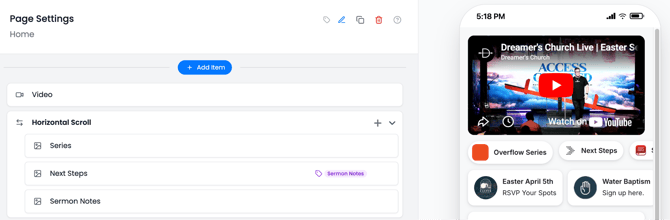
- Use “+ Add Item” to add new components to a page
- Drag and arrange sections to control layout flow
- Manage multiple content groups within a single page
### **Live Preview & Editing**
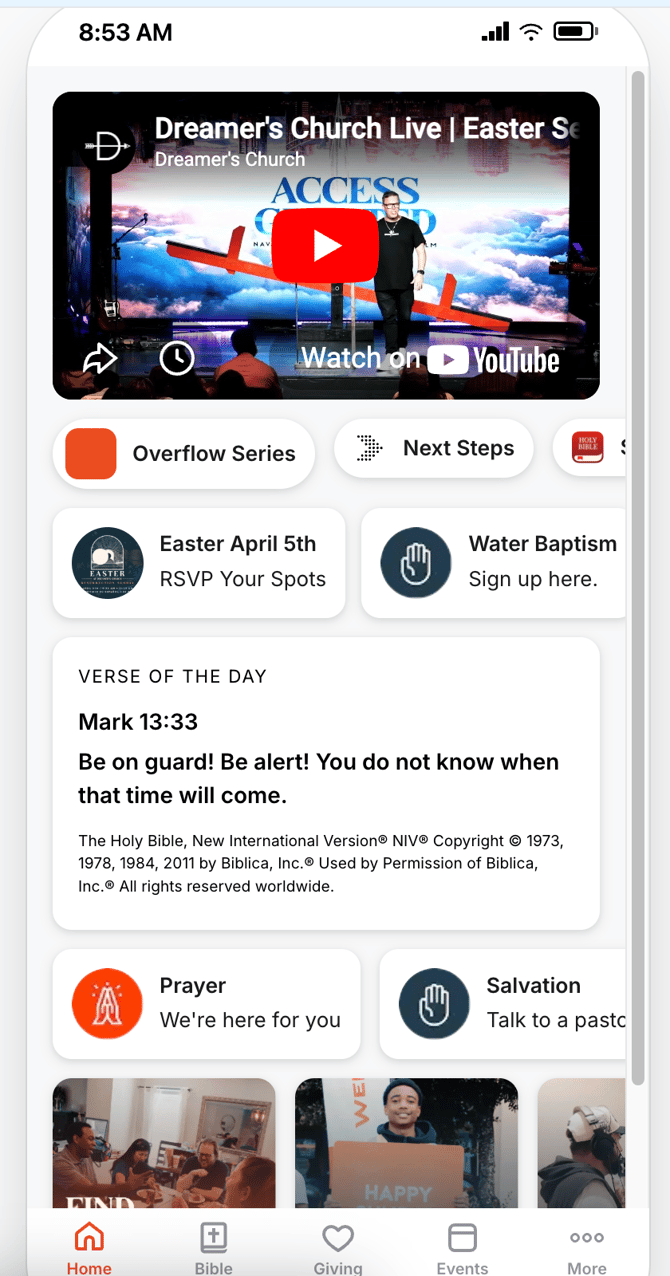
On the right-hand side of the builder, you’ll see a real-time mobile preview of your app.
- Instantly view how your changes will appear to users
- Test layout, spacing, and content flow as you build
- Ensure a mobile-optimized experience
### **Saving & Publishing**
- Click Save to preserve your changes.
- Changes are typically made in Draft mode before going live.
- You can safely edit and refine your app before publishing updates.
### **Best Practices**
- Keep your layout focused and easy to navigate.
- Use Horizontal Scroll sections to highlight key content.
- Prioritize clear calls-to-action (ex: Next Steps, Events).
- Maintain consistent branding through Theme settings.
- Regularly review and update content to keep it fresh.
### **How to Upgrade to VisitorTap Pro**
Ready to unlock more with VisitorTap Pro? You can submit an upgrade request right from your VisitorTap dashboard.
1. Click **Account** in the left-hand menu.
2. Under **Manage VisitorTap**, select **Change VisitorTap Subscription Plan**.
3. Add any additional comments for our team, if needed.
4. Click **Submit Request**.
Our Customer Success team will process your request and reach out to you if needed. Your new monthly subscription rate will begin on your next billing date.
- [VisitorReach Tools](https://connect.visitorreach.com/help/visitorreach-tools?hsLang=en#main-content)
- [Dashboard](https://connect.visitorreach.com/help/visitorreach-tools?hsLang=en#dashboard)
- [Journeys](https://connect.visitorreach.com/help/visitorreach-tools?hsLang=en#journeys)
- [Conversations](https://connect.visitorreach.com/help/visitorreach-tools?hsLang=en#conversations)
- [Group](https://connect.visitorreach.com/help/visitorreach-tools?hsLang=en#group)
- [Account](https://connect.visitorreach.com/help/visitorreach-tools?hsLang=en#account)
- [Marketing](https://connect.visitorreach.com/help/marketing?hsLang=en#main-content)
- [Social Media](https://connect.visitorreach.com/help/marketing?hsLang=en#social-media)
- [Digital Health](https://connect.visitorreach.com/help/marketing?hsLang=en#digital-health)
- [Website](https://connect.visitorreach.com/help/marketing?hsLang=en#website)
- [Coaching](https://connect.visitorreach.com/help/coaching?hsLang=en#main-content)
- [Role of the Church](https://connect.visitorreach.com/help/coaching?hsLang=en#role-of-the-church)
- [Outreach & Evangelism](https://connect.visitorreach.com/help/coaching?hsLang=en#outreach-evangelism)
- [Meaningful Conversations](https://connect.visitorreach.com/help/coaching?hsLang=en#meaningful-conversations)
- [VisitorTap](https://connect.visitorreach.com/help/visitortap?hsLang=en#main-content)
- [VisitorTap 101](https://connect.visitorreach.com/help/visitortap?hsLang=en#visitortap-101)
- [Taptree](https://connect.visitorreach.com/help/visitortap?hsLang=en#taptree)
- [Placement & Best Practices](https://connect.visitorreach.com/help/visitortap?hsLang=en#placement-best-practices)
- [Managing Your Dashboard Features](https://connect.visitorreach.com/help/visitortap?hsLang=en#managing-your-dashboard-features)
- [Troubleshooting - VisitorTap Help Center](https://connect.visitorreach.com/help/visitortap?hsLang=en#troubleshooting-visitortap-help-center)
- [FAQs](https://connect.visitorreach.com/help/faqs?hsLang=en)
- [Training](https://connect.visitorreach.com/help/training?hsLang=en)
[](https://connect.visitorreach.com/help?hsLang=en)
[mailto:support@visitorreach.com](mailto:support@visitorreach.com)
Copyright © 2024, VisitorReach