---
title: How does NFC Technology Work Exactly?
description: NFC is the secure, app-free technology behind Tap Cards, enabling instant connections with just a simple tap of a phone.
---
[Skip to content](https://connect.visitorreach.com/help/how-does-nfc-technology-work-exactly#main-content)
English
Show submenu for translations
[](https://dashboard.visitorreach.com/)
Open main navigation
Close main navigation
- English
Show submenu for translations
How can we help you?
- There are no suggestions because the search field is empty.
1. [Knowledge Base](https://connect.visitorreach.com/help?hsLang=en)
2. [VisitorTap](https://connect.visitorreach.com/help/visitortap?hsLang=en)
3. [Troubleshooting - VisitorTap Help Center](https://connect.visitorreach.com/help/visitortap?hsLang=en#troubleshooting-visitortap-help-center)
# How does NFC Technology Work Exactly?
## NFC stands for Near-Field Communication. It’s the wireless technology that powers Tap Cards, allowing a phone to connect just by holding it close.
NFC is designed for speed, simplicity, and intentional use. It only works when two devices are close together (just a few centimeters), so the interaction is secure and deliberate. That short range is exactly what makes it great for real-time, face-to-face moments.
You’ve probably used NFC before without even thinking about it. It’s the same technology behind contactless payments, hotel key cards, and transit passes. And because it’s now standard in most smartphones, more than 2 billion phones worldwide are NFC-enabled.
### **How NFC Works**
**NFC doesn’t require an app, a download, or even power from the card itself.**
Each card contains a small chip with a tiny antenna. It’s passive, meaning it doesn’t require a battery. When someone taps their phone to the card, the phone provides just enough energy to activate the chip and receive a short message that instantly opens a mobile-friendly page like a Taptree or direct link.
There are also different ways NFC can be used, depending on the mode. **Tap Cards use what’s called** **Reader/Writer Mode**—your phone (the reader) communicates with a passive tag (the card) to retrieve a small piece of data, like a URL. 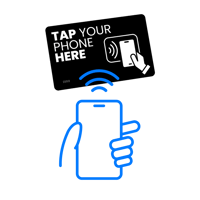
Other NFC modes include:
- Card Emulation – Used when your phone acts like a credit card or transit pass.
- Peer-to-Peer Mode – Allows two devices (like phones) to exchange data.
**For Tap Cards, only Reader/Writer Mode is used,** so the phone pulls information from the card, not the other way around.
### **What NFC Is *Not***
To help clarify what makes NFC unique, here’s what it isn’t:
- **Not Bluetooth or Wi-Fi:** NFC doesn’t require pairing, passwords, or a wireless signal. It works through proximity (just a tap) and it’s done.
- **Not a QR Code:** There’s no need to open a camera or line up an image. NFC works even if the card is behind a sign, on a counter, or at an odd angle.
- **Not an app-based tool:** Most modern smartphones support NFC out of the box. There’s nothing to download, install, or configure for it to work.
### **NFC Is a Trusted Technology**
One of the reasons NFC is trusted in payment systems and access control is because it’s inherently secure. Its short range means interactions only happen when devices are intentionally close together, reducing the risk of accidental scans or interference.
Unlike QR codes, NFC doesn’t broadcast data. The chip only responds when it’s within range of a compatible device. And because Tap Cards are passive and don’t store personal information, there’s no risk of data being tracked or shared.
---
### Need Help?
[VisitorTap FAQ](https://connect.visitorreach.com/help/visitortap-faq?hsLang=en) | [Contact Us](mailto:Visitortap@visitorreach.com)
- [VisitorReach Tools](https://connect.visitorreach.com/help/visitorreach-tools?hsLang=en#main-content)
- [Dashboard](https://connect.visitorreach.com/help/visitorreach-tools?hsLang=en#dashboard)
- [Journeys](https://connect.visitorreach.com/help/visitorreach-tools?hsLang=en#journeys)
- [Conversations](https://connect.visitorreach.com/help/visitorreach-tools?hsLang=en#conversations)
- [Group](https://connect.visitorreach.com/help/visitorreach-tools?hsLang=en#group)
- [Account](https://connect.visitorreach.com/help/visitorreach-tools?hsLang=en#account)
- [Marketing](https://connect.visitorreach.com/help/marketing?hsLang=en#main-content)
- [Social Media](https://connect.visitorreach.com/help/marketing?hsLang=en#social-media)
- [Digital Health](https://connect.visitorreach.com/help/marketing?hsLang=en#digital-health)
- [Website](https://connect.visitorreach.com/help/marketing?hsLang=en#website)
- [Coaching](https://connect.visitorreach.com/help/coaching?hsLang=en#main-content)
- [Role of the Church](https://connect.visitorreach.com/help/coaching?hsLang=en#role-of-the-church)
- [Outreach & Evangelism](https://connect.visitorreach.com/help/coaching?hsLang=en#outreach-evangelism)
- [Meaningful Conversations](https://connect.visitorreach.com/help/coaching?hsLang=en#meaningful-conversations)
- [VisitorTap](https://connect.visitorreach.com/help/visitortap?hsLang=en#main-content)
- [VisitorTap 101](https://connect.visitorreach.com/help/visitortap?hsLang=en#visitortap-101)
- [Taptree](https://connect.visitorreach.com/help/visitortap?hsLang=en#taptree)
- [Placement & Best Practices](https://connect.visitorreach.com/help/visitortap?hsLang=en#placement-best-practices)
- [Managing Your Dashboard Features](https://connect.visitorreach.com/help/visitortap?hsLang=en#managing-your-dashboard-features)
- [Troubleshooting - VisitorTap Help Center](https://connect.visitorreach.com/help/visitortap?hsLang=en#troubleshooting-visitortap-help-center)
- [FAQs](https://connect.visitorreach.com/help/faqs?hsLang=en)
- [Training](https://connect.visitorreach.com/help/training?hsLang=en)
[](https://connect.visitorreach.com/help?hsLang=en)
[mailto:support@visitorreach.com](mailto:support@visitorreach.com)
Copyright © 2024, VisitorReach